Technical Deep Dive
The duo/ab Protocol Infrastructure
Most teams hit a ceiling with AI tools. Chat-based workflows work for small tasks, but context resets kill compound progress. The protocol solves this: structured markdown files in Git that grow with your project, so every AI interaction builds on the last.
The protocol family (uno/duo/tre) is designed for different working modes. This page documents duo/ab specifically, the Construct protocol for software development.
Watch the Overview. See how the protocol works in practice
The Protocol Family
Three protocols share one foundation. Think of a brewery and its recipes. The brewery is the constants that make something a kaygee protocol at all. Files are memory. The atomic cycle. RECORD after every unit of work. Each protocol is a recipe brewed on those constants, shaped for a different kind of work. uno and duo are versioned in the open.
uno
Operate · an ale
An OS for managing X. The substrate for ongoing work, monolithic and domain-shaped, defined when the repo starts.
Learn uno →duo
Construct · a lager
Building bounded things. A construction site where the Architect designs and the Builder implements.
Learn duo →tre
Automate
Governing fleets of autonomous agents acting on live state. The same Hard Rules at machine speed, with audit and authorization.
In active researchWhere the rules live. Protocol-level rules apply to every flavour because it is a kaygee protocol. Flavour-level rules apply because you chose that recipe. The right shape for an ale isn't the right shape for a lager. The full articulation is in the essay Why v1.3 is a minor bump. Versions and changelogs live on the templates, protocol-uno and protocol-duo.
The Atomic Interaction Model
Every interaction follows the same five phases, whether you're planning architecture or fixing a bug.
Each cycle's RECORD makes the next cycle's LOAD richer. That's the compound effect.
LOAD
Read context files, check git status
CLARIFY
Confirm understanding before acting
EXECUTE
Do the work
RECORD
Update docs, commit immediately
REFLECT
Surface improvements, flag drift
The cycle runs automatically. What changes is the role. The Architect designs and gets sign-off, then the Builder executes the approved plan. Claude Code's plan mode runs the handoff. No ..end or ..exit. RECORD commits every interaction.
The 4 Habits
The atomic cycle is the engine. Four habits make it compound. Plan in markdown, protect decisions, align with files, measure compound. The Learn page walks through each one with the before and after.
See the four habits in depth →Understanding the Four Layers
Every developer progresses through these layers. Most get stuck at Layer 2. Here's why, and how to escape.
Layer 1: Chat Interface
You use Claude, ChatGPT, or Cursor in its default state. Fast to start, but context resets constantly.
Example: Copy-pasting code snippets, losing history when you refresh.
Layer 2: Custom Instructions
You add system prompts, create .cursorrules files, try to inject "memory" into every session.
Ceiling: You hit the 41KB wall. Chat history bloats. The AI forgets your architectural decisions. 85% of your token budget is wasted on "thinking" that could be summarised.
Layer 3: Transparent Infrastructure
You build structured markdown files (role.md, context.md, etc.) that agents read/write automatically via MCP.
This is where you escape the ceiling. Context is Git-managed. Agents reference files instead of relying on fragile chat memory.
Layer 4: Context Servers at Scale
You run dedicated context servers, custom MCP implementations, and multi-agent orchestration.
This is enterprise-grade infrastructure. You don't need this unless you're running AI at organizational scale.
Most developers never reach Layer 3. They bounce between Layer 1 and Layer 2, hitting the same context walls over and over. Layer 3 is the breakthrough. It's where you stop fighting the tool and start building systems that scale.
How the Protocol Works
A transparent system built on three principles: structured files, agent roles, and Git-based context management.
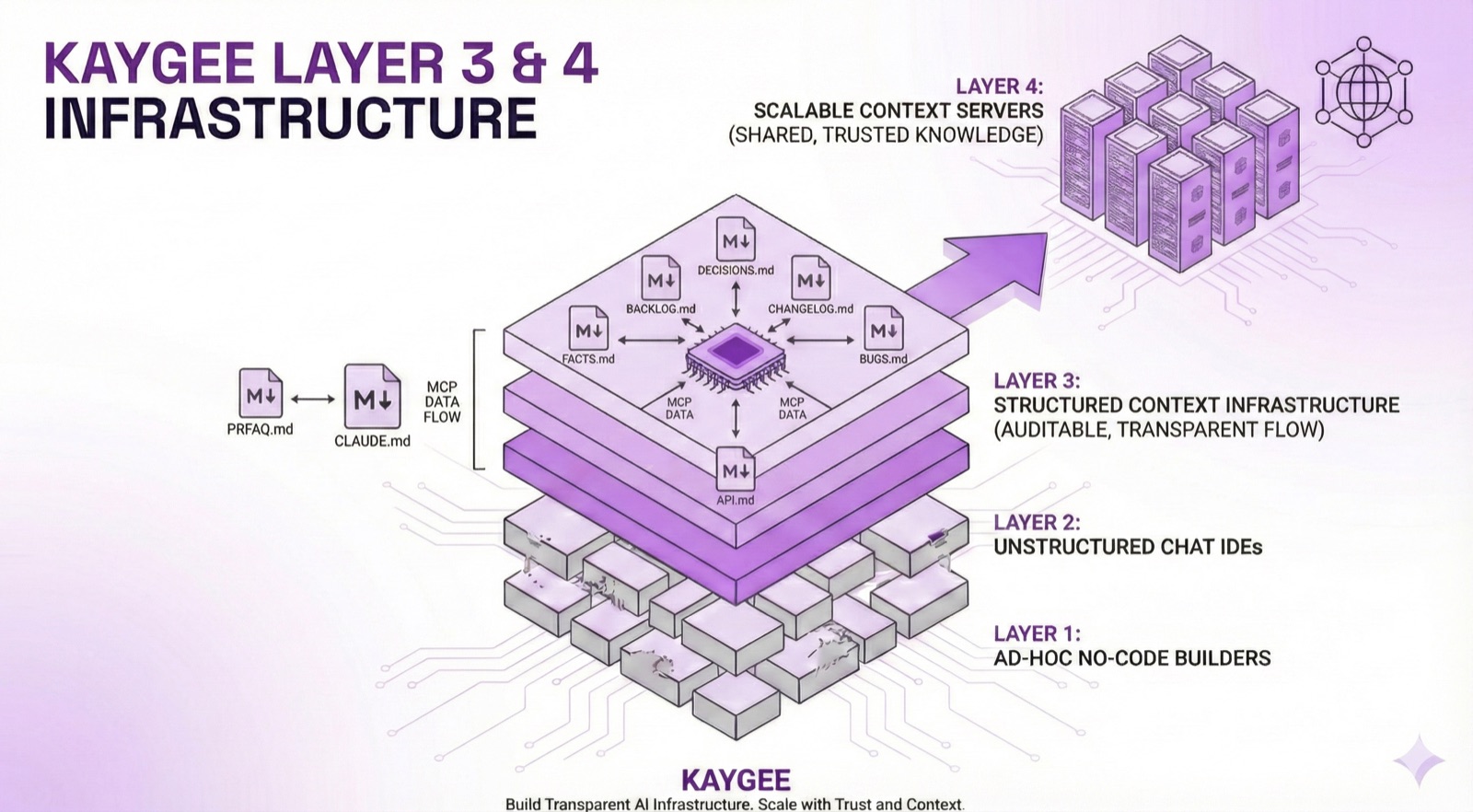
The protocol gives you context files in Git. Layer 4 scales to team-wide context servers.
The Files
Two files run the engine. The rest serve the four habits. The full set ships in the template. Here's the shape, and why each piece exists.
Step 1
We work like this
These two files run the atomic cycle. Every session starts here.
CLAUDE.mdTechnical context: stack, patterns, standards.
▶See what this looks like
Example:
Tech Stack
• React 18 + TypeScript (strict mode)
• Tailwind CSS v4.0 (CSS variables, no config file)
• Vite for build tooling
File Structure
• /features/public/ User-facing features
• /data/ Business data
• /types/ TypeScript types
AI learns the codebase structure instantly. No "how do we handle styling?" questions.
ROLE_PROTOCOL.mdThe Architect and Builder roles, and the atomic cycle.
Architect designs and gets sign-off. Builder executes.
▶See what this looks like
Two roles, one cycle
Architect → design, get sign-off, record decisions
Builder → build the approved plan
The role changes, the cycle stays the same. Every interaction runs LOAD → CLARIFY → EXECUTE → RECORD → REFLECT.
Step 2
We work on this
PRFAQ.mdThe destination. AI reads this first.
Product vision and strategy. Where we're going and why.
▶See what this looks like
Example:
Instead of buried vision docs, we write:
"We're teaching product teams to compound their effort with AI. Success = PMs create GitHub context in 90 minutes. Why it matters. Their work finally gets seen by engineers."
AI reads this first to understand the destination, not the next task.
Step 3
We split our work
TODO.mdAI's work queue (with acceptance criteria).
▶See what this looks like
Example:
- [ ] Add webinar CTA to ForProductTeams
- AC: Button text "Watch the 30-Min Webinar"
- AC: Links to YouTube URL
- AC: Uses secondary button styling
Acceptance criteria make "done" verifiable. No ambiguity.
TASKS/Your work queue. Human tasks tracked in markdown.
Step 4
I learn, we go faster
DECISIONS.mdWhy we chose this (ADRs).
▶See what this looks like
Example ADR:
DEC-009: React Router (not Next.js)
Context. Landing page needed routing
Decision. Use React Router, not Next.js
Rationale. SPA works, no SEO/SSR needed, simpler deployment
AI understands context behind decisions. Can apply same reasoning to new features.
PROGRESS.mdWhat shipped, when, and why. Each entry makes the next session richer.
PRINCIPLES.md and CONSTRAINTS.md are distilled from DECISIONS.md as patterns emerge.
The Harness
You write the rules in markdown. The AI follows them. Until it saves context somewhere you can't search, or a session ends with work uncommitted, or the next session starts from scratch.
The protocol is the playbook. Any LLM can read it. Since v1.3 the playbook runs hookless by default. Structure does the enforcing, and hooks are an opt-in coach you add deliberately, not the engine.
Protocol
The playbook
Markdown files that show any AI what good looks like. Portable across every LLM that reads files.
Works everywhere
Harness
The opt-in coach
Claude Code hooks, bound in .claude/settings.json, that you opt into when a repo earns them. The canonical default is none.
Travels in git. Clone the repo, get the playbook.
How it got here
v1.2 bound every lifecycle moment
Three hooks shipped as standard. Session start, pre-tool checks, a stop gate. The reflex was to celebrate the new primitive by binding all of it.
Real use pushed back
Per-interaction policing cost more than it caught. v1.2.2 kept a single coach, a stop hook that nudged only when a session ended with work uncommitted. Not a wall. A tap on the shoulder.
v1.3 made hookless the default
A production deployment ran for months with no hooks and the playbook held. New bindings now need a named gap they fill, not enthusiasm for the primitive.
The opt-in pattern. Want the commit nudge anyway? Bind one Stop hook that blocks only on uncommitted changes. That is the whole binding. Don't add session-start or pre-tool hooks unless you can name the protocol gap they fill.
Structure over supervision.
The fence is the playbook itself. Hard rules up top, constraints in their own file, decisions recorded where the next session reads them. Nothing polices every action, and you don't need hooks to start. The structure catches the things that actually cost you. Forgotten saves, scattered context, sessions that start from zero.
The protocol is the playbook. Hooks are the opt-in coach. Clone the repo, get the playbook.
The Architect and Builder Workflow
The Discovery. Loading every file for every session burned 15% of the token budget before any work began. The fix was roles. The Architect designs from the strategy files (PRFAQ.md, DECISIONS.md, CONSTRAINTS.md). The Builder executes from the plan (TODO.md, CLAUDE.md).
Claude Code's plan mode now runs that handoff natively. The protocol's job is to make the plan stick, acceptance criteria in TODO.md, decisions in DECISIONS.md.
Every interaction follows the same five-phase cycle. What changes is the role, designing or building.
Design and sign off
Design, strategy, planning
- • LOAD PRFAQ, DECISIONS, CONSTRAINTS, PROGRESS
- • CLARIFY Validate approach before building
- • EXECUTE Write specs, design architecture
- • RECORD Update DECISIONS.md, TODO.md
- • REFLECT Flag risks, surface trade-offs
Build the plan
Write code, execute tasks
- • LOAD CLAUDE.md, TODO.md, TASKS/
- • CLARIFY Confirm task, check AC
- • EXECUTE Write code, implement feature
- • RECORD Update PROGRESS.md, commit
- • REFLECT Flag what didn't work
Key Features
- ✓Acceptance Criteria. Every task has testable conditions. "Done" is verifiable, not ambiguous.
- ✓Automatic RECORD. Every interaction commits decisions and context. No ceremony required. Fossilisation is built into the cycle.
- ✓Plan Persistence. The approved plan lands in TODO.md and DECISIONS.md. The build phase works from a real contract, not a memory.
- ✓Drift Detection. REFLECT surfaces when code diverges from documented decisions.
- ✓Recovery Protocol. A documented, levelled recovery path for when things break, from a simple reset to a full environment rebuild.
Transparent
Every decision is visible in markdown. No hidden context.
Git-Managed
Version control for AI context. Rollback bad decisions.
Scalable
No token limits. Context grows with your project.
Ready to Implement?
Clone the template, follow the learn guide, and run your first atomic cycle. The protocol is open source. Start building today.
Already running it? Share what's working, what you changed, or what could be better. Send feedback upstream →